Sunday, February 28, 2016

BMW ICOM A2 vs. ICOM A3 diagnostic scanner

BMW ICOM diagnostic and programming scanner for BMW, MINI Cooper and Rolls Royce has upgraded to third generation-ICOM A3. Then what’s the difference among ICOM A,ICOM A1ICOM A2 and ICOM A3?
6 major differences are listed below:
  • Appearance:
BMW-ICOM-comparison-1
ICOM and ICOM A share the same appearance.
ICOM A3 designed with light weight and smaller size
All BWM ICOM system comes with three modules ICOM A, ICOM B and ICOM C
ICOM A – main adapter with OBD II connector for MOST, KCAN, DCAN
ICOM B – additional adapter for optic line, use USB connection with ICOM A
ICOM C – adapter for old vehicles with round 20-pin connector.
  • ICOM Firmware/Hardware
ICOM A and ICOM A2 share the same firmware. Four firmware version optional: V1.1.8, V1.33 and V1.36, and new V1.38. Each version firmware update tool can be downloaded free here:
1.18 firmware update tool
http://down.uobd2.net/icom-and-icom-a1-and-icom-a2-v1.18-firmware-update-files.zip
1.33 firmware update tool
http://down.uobd2.net/icom-a1-a2-and-super-version-a2-v1.33-firmware-update-files.zip
1.36 firmware update tool
http://down.uobd2.net/icom-a1-a2-and-super-version-a2-v1.36-firmware-update-files.zip
1.38 firmware update tool
http://down.uobd2.net/icom-a1-a2-1.38-firmware-upgrade-files.zip
Best quality BMW ICOM A2 PCB display
pcb-board-for-icom-icom-a2
ICOM A3 comes with firmware version: V1.37
The new ICOM A3 has a better built firmware which supports better heat dissipation feature and able to receive a significantly more powerful processor and more storage capacity. A3 comes with robust aluminum box will help to avoid damage in harsh environments when using.
3) ICOM Software:
ICOM A and ICOM A1 software: ISIS (ISTA-P) and ISID (ISTA-D), the latest version is: 2013.01.
ICOM A2 and ICOM A3 software: ISTA-D ISTA-P (or Rheingold version).
There will be newer software version released continually in the future.
ISIS/ISTA-D=diagnostic software
ISIS/ISTA-P= programming software
  • Function:
ICOM A and ICOM A2 perform same function. But due to the old ICOM A module have problem in the cooling and protection design, ICOM A2 adopts the whole aluminum shell body, using aerial explosion-proof connector; and it use the joint connection line which similar to the Mercedes-Benz SDCONNECT COMPACT 4.
BWM ICOM A2 comes with Network cable, can do Fiber optical programming, but ICOM A3 does not contain Network cable, can not do Fiber optical programming.
  • Operating system
ICOM A: support Win XP O/S only.
ICOM A1: Win XP and Win 7 64 bit O/S
ICOM A2: Win XP and Win 7 O/S
ICOM A3: Professional Win7 64 bit (NO Win XP)
6) Vehicle support
ICOM A2 and ICOM A3 cover the same BMW, MINI and Rolls Royce models.
In conclusion:
  1. The newest version ICOM A2 works better in cooling, runs faster and works more stable, not easier broken than older ICOM.
  2. ICOM A3 can program all units for all BMW series expect media system.
  3. ICOM A3 work more stable and has stronger compatibility than ICOM A2, A1.


Saturday, February 27, 2016

How to connect Xtool PS2 GDS gasoline Bluetooth scanner

How to setup WIFI wireless connection of Xtool PS2 GDSgasoline Bluetooth diagnostic tool?
Follow the correct guide below:
Bluetooth wireless diagnostic is the newly added feature of PS2GDS scanner, if you follow the old way to connect the xtool device, the diagnostic scanner will fail to work properly.
Here is the diagram of connecting PS2 Bluetooth scanner:


If the WIFI icon is not in “X” condition which means the wireless connection is built. Follow the connect method above, the Bluetooth connection will automatically matched and ready to use.
FAQ:
Q: Does the scanner come with built-in battery or additional power supply?
A: The Bluetooth PS2 comes with built-in battery.  
Q: Can this work on diesel heavy-duty model?
A: This is only for gasoline cars, for truck models, you need to order PS2 truck scanner Item No: SH09.
Q: I try to register with product serial number, password and distributor code, but fail to access?
A: The Distributor code should be “xtool” (in lower case)

More Other Relation Auto scanner Product : Foxwell  Foxwell AutoMaster Pro Foxwell NT414 Foxwell NT644  Foxwell NT300  Foxwell GT80 Plus

Friday, February 26, 2016

How to disable DRLs with Bluetooth ELM327

Tool needs:
A ELM327 scan tool (take this cheap Bluetooth one for €6)
Phone or Tablet
1)    Download Carista OBD2 APP on your phone or tablet.
The app is available on Google Play Store
https://play.google.com/store/apps/details?id=com.prizmos.carista&referrer=utm_source%3Dclublexus
Download the vehicle specific functionality one. Price may differs, but overall cheap under $10. Take Lexus-specific as an example, cheap $9.99. You can also customize your car to your liking! Carista is compatible with standard (i.e. inexpensive) ELM327 Bluetooth adapters that plug into your vehicle’s diagnostic OBD2 port.
2)    Plug the Bluetooth ELM327 adapter into the vehicle OBD port.
3)    Turn the vehicle ignition to ON position without the engine OFF
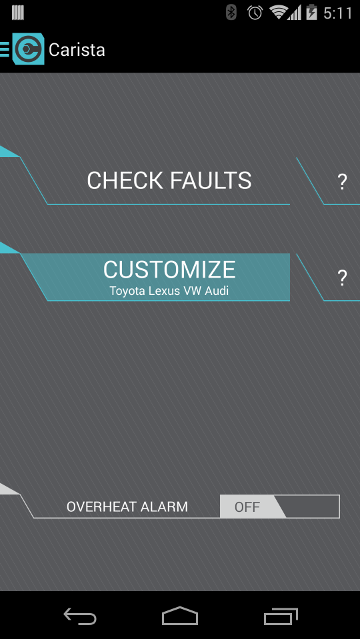
4)    Open the software and select “CUSTOMIZE” function on the main menu. If it is the first time you use the device, you have to pair with the Bluetooth VIN using 1234 or 0000 to confirm.
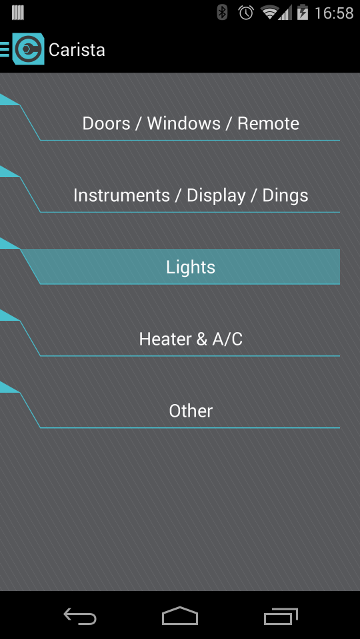
5) The program will display some function option list. Select “Lights”
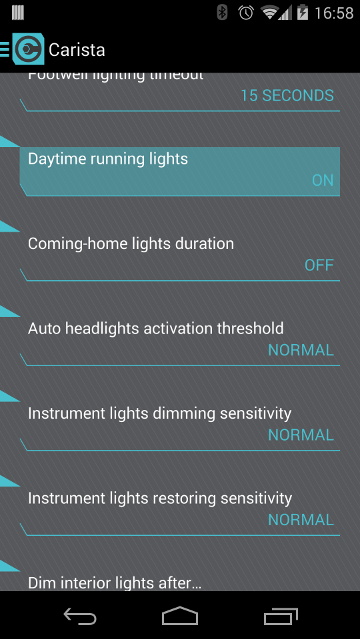
6) You will be shown the current daytime running lights status–ON. Double click the “Daytime Running Lights” icon
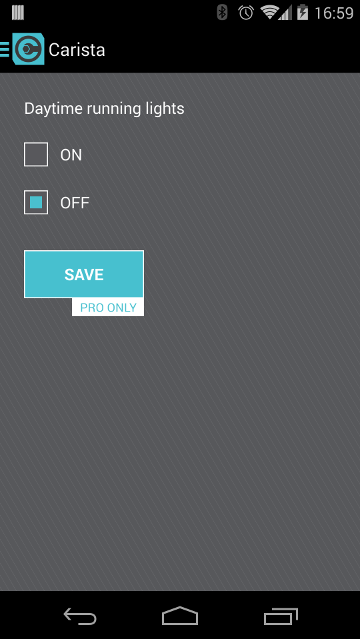
7) Tick “OFF” and save settings.
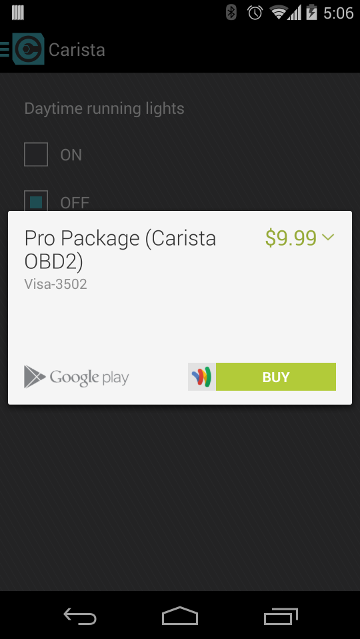
8) The program will pops out a message ask for Carista OBD2 app payment. Click “BUY” to pay for the app. If this is the first time you’re changing a setting, the app will launch the Google Play in-app billing screens and will guide you to purchasing the Pro Package (which is required for changing settings; it’s a one-time purchase and then you can change as many settings as you like, as many times as you like). The Pro Package also gives you access to advanced diagnostics of all Toyota/Lexus ECUs, not just OBD2 stuff.
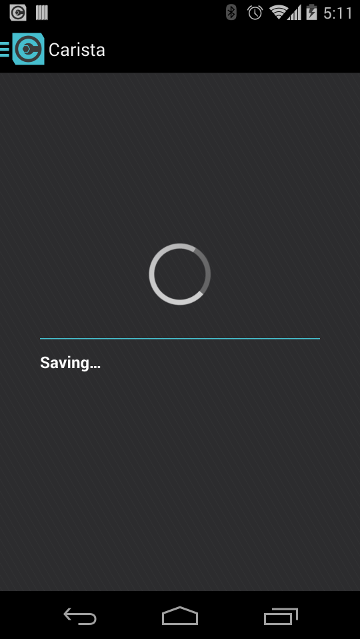
9) After pay for the app, the system is saving previous settings. You are able to do some further settings. Otherwise, exit the program.
More Other Relation Auto scanner Product : Foxwell  Foxwell AutoMaster Pro Foxwell NT414 Foxwell NT644  Foxwell NT300  Foxwell GT80 Plus

Thursday, February 25, 2016

Foxwell Launch NT800 Diagnostic and Analysis System -Press

Foxwell After 2 years of R&D, 12 months of hardware refinement, the stunning NT800 is nearly ready. The expansion in Foxwell’s portfolio is due to demand from our customers, wanting a more features, higher functionally, and more coverage. While our customers requests are our highest priority, new hardware is distilled, refined, and field tested, to ensure it is worthy of a Foxwell badge.

“We were proud to hold the final vision in our hands. The NT800 expands Foxwell’s diagnostic equipment portfolio into the professional repairer niche. I love the feel of this tool, it’s simple, yet significant. It has a nice feel in your hands, The Foxwell quality we have come to love. While looks and feel are important, it’s clear tool has been built for the user, intuitive navigation, fast operation. This tool just ticks every single box.”
Dayle Thomas, Foxwell Australia
It is important for automotive repair shops to get as much coverage as possible to effectively and quickly service any vehicles. The NT800 provides professional diagnosis on more than 52 American, Asian, and European vehicle mass. Whats also important is having access to a vast range of controllers (ABS, SRS< Instrument Cluster, ect.), Live Data, and System / component level bi-directional control. Getting the job done faster and with a greater degree of accuracy.In addition, It has access to the most common requires service features, like brake deactivation, service resets, and transmission adaptions.

More Other Relation Auto scanner Product : Foxwell AutoMaster Pro Foxwell NT414 Foxwell NT644  Foxwell NT300  Foxwell GT80 Plus

Foxwell NT800 Press Release Cover

Wednesday, February 24, 2016

Foxwell NT644 AutoMaster Pro All Makes Full Systems EPB Oil Service Scanner

Delicately developed by the most distinguished experts of the industry, Foxwell NT644 provides workshops, technicians and enthusiasts alike affordable professional diagnostic solutions. It stands out in a variety of similar tools by delivering wider coverage of vehicles, more accurate diagnosis, more reliable performance and better user experience.

Foxwell NT644 AutoMaster Pro All Makes Full Systems + EPB+ Oil Service Scanner
Foxwell NT644 AutoMaster Pro Features and Benefits:
1. Coverage includes 49 manufacturers
2. Works on the latest 2012/2013 models
3. Dealer level oil light service light reset functions on 32   manufacturers
4. Advanced EPB functionalities on 13 manufacturers
5. Compatible with both OBDI and OBDII cars, SUVs, minivans, light-duty trucks sold worldwide
6. Reads and clear codes and turns off MILs of all systems
7. Requests and records live sensor data
8. Provides live data graphing
9. Merges PID graphs for easy and intuitive diagnosis
10. Displays freeze frame data
11. Retrieves ECU information
12. Supports all 10 OBDII test modes, such as live data, O2 sensor   test, component test and more
13. Enhanced OBDII Mode 6 functionality
14. Code troubleshooters provide you faster and easier diagnosis
15. Multilingual menu options and code definitions
16 SD memory card for data backup and software update
17. As easy as 1-2-3 with large TFT color screen and menu-driven   operations
18. Ergonomic design and ruggedly built for both shop and road tests
Foxwell NT644 AutoMaster Pro Specifications:
Display: Backlit, 480*272 TFT color display
Working Temperature: 0 to 60℃ (32 to 140℉)
Storage Temperature: -20 to 70℃ (-4 to 158℉)
External Power: 8-18 Volts powered by vehicle battery
Vehicle Coverage:

ManufacturerDiagnostic FunctionEPB ServiceOil Light Reset Function
Chrysler
Ford
GM
AU Ford
Acura
Daewoo
Honda
Hyundai
Toyota
Infinite
Isuzu
Kia
Lexus
Mazda
Mitsubishi
Nissan
Scion
Subaru
Suzuki
Abarth
Alfa Romeo
Audi
BMW
Bentley
Bugatti
Citroen
Dacia
EU Ford
Fiat
Jaguar
Lancia
Land Rover
Maybach
Maserati
Mercedes Benz
Mini
Opel
Peugeot
Porsche
Renault
Saab
Seat
Skoda
Smart
Sprinter
Vauxhall

Package list:   
1 pc x  NT644 Scan Tool
1 pc x  User’s Guide
1 pc x  Memory Card
1 pc x  USB Cable
1 pc x  Diagnostic Cable
1 pc x  Blow molding case

More Foxwell Product 

Foxwell BT100 12V Car Battery Tester for Flooded/AGM/GEL

 Relation News Search :  Autel Maxisys MS906 Autel Maxisys Autel Maxidas ds708
More Other Relation Auto scanner Product : Foxwell  Foxwell AutoMaster Pro Foxwell NT414  Foxwell NT300  Foxwell GT80 Plus

Tuesday, February 23, 2016

Multi language Toyota techstream 10.30.029 free download

Multi language Toyota techstream 10.30.029 free download:www.uobd2.net
techstream 10.30.029 workable hardwares: item No. sp70, sp70-b, sv46, sv46-b, sp61, SP62,,SP64,SV46-C, SP245 , SP245-W, VX01, VX01-W, HKVX01, SP161-C2 (All Toyota scanner hardware running software techstream http://www.uobd2.net/producttags/techstream.html)
(sp70, sp70-b, sv46, sc46-b, sp61) mvci mini vci toyota techstream V10.30.029 install video:
https://www.youtube.com/watch?v=mjRPOTMrOjE

More Other Relation Auto scanner Product : Foxwell  

Friday, February 19, 2016

ABS Airbag Reset AutoMaster Tool Foxwell nt630


Top Reasons to Get NT630:
1. Full vehicle coverage, Support more than 52 brand vehicles from American, Aisan and European.
Vehicle Coverage:
AreaManufacturer
AmericaChrysler, Ford, GM
AsiaAcura, Au Ford, Daewoo, Honda, Holden, Hyundai, Infiniti, Isuzu, Kia, Lexus, Mazda, Mitsubishi, Nissan, Scion, Subaru, Suzuki,Toyota
EuropeAbarth, Alfa-Romeo, Audi, Bentley, BMW, Bugatti, Citroen,Dacia EU Ford, Fiat, Jaguar, Lancia, Land Rover, Maybach, Mercedes Benz, Mini, Opel, Peugeot, Porsche, Renault, Saab, Seat, Skoda,

2.Foxwell nt630 update: 18 Months Free Update.
3. The easy yet elegant design of this series was developed by technicans for technicans. Clearly arranged keypad, menu-driven operation, shortcuts and impressive 4.3″ color display together make the series extermely easy to use.
4. NT630 is constructed to resist impact and damage in the tough workshop environment. A rubberized sleeve protects your investment. The secure fit, extra corner padding and screen protector ensure your scan tool will be around for a long time.
5. NT630 lets you identify the vehicle you are testing rapidly and accurately on the basis of its VIN number. It automatically retrieves the VIN code or you can enter it manually to identify the model you are working on.3. NT630 shows live vehicle sensor data in text and graph format and allows you to focus on any suspicious or symptom-specific data parameters. It’s powerful graphing capability gives you the “real picture” of what’s going on in the vehicle. You can view 2 parameter graphs simultaneously and merge them into one coordinate, so you can easily see how they affect each other, providing you with the most comprehensive and funcational look at live data possible.
6. Foxwell nt630 engine abs airbag diagnostic scanner cannot only read your codes, but it can also actuate components, run system tests, program control modules. Reading the trouble codes from your vehicle is easy, but without live data, bi-directional controls and other special functions, you may not have enough information to get the problem fixed right.
It allows you to use the scan tool temporarily activate or control ABS/airbag system or component. With NT630, the check of electronic components such as switches, sensors, relays and actuators is made a simple task, saving your time and labor costs. It gives you the ability to “flash” ABS and airbag control units with new program data and allows for the coding and programming of a replacement control module or changing previously stored incorrect coding as expensive factory tools do.

Foxwell NT630 ABS Airbag Reset Tool does not only have extensive coverage of vehicles but also provides accurate and professional diagnosis of ABS and airbag faults for OBDI and OBDII cars, SUVs, minivans, light-duty trucks sold worldwide
Foxwell nt630 price: US$179.00


Thursday, February 18, 2016

2016 Foxwell for sale – foxwellshop.com

Foxwell is a professional supplier of automotive diagnostic products, services and solutions in the aftermarket. We combine industry knowledge, manufacturing expertise, and technological innovation to offer a broad portfolio including OBDII code readers, scanners, electrical brake tools, Data Logger devices and other emerging tools for the benefits of our customers.
At Foxwell, we innovate at all levels of the technology with the most distinguished experts of this industry and a passionate commitment to excellence to create continued growth and profits for our customers, partners, investors and employees.

foxwell-2
foxwell-4
foxwell-3
foxwell-1

Foxwell Digital

Foxwell NT500 VAG scanner
How to buy OBDII scanner search: UOBD2
Relation News Search : Autel Maxisys 

Wednesday, February 17, 2016

Foxwell debuts the solution for OBD2 faults

Foxwell adds the easiest OBD code reader NT301 of the industry to its code reader product line on July 17, 2014. Upon its official release, NT301 instantly gains widely attention from our partners all around the world.  

Why is NT301 the easiest code reader of the industry?
1. Hotkeys
    Reading/Erasing DTC and I/M readiness hot keys make it easy to use this tool right out of the package.     They provide quick access to emissions readiness status, DTC information and erase function.

2. Identify vehicle by VIN
Automatic VIN acquisition and decoding makes it much easier to read manufacturer specific codes and enhanced mode 6 data.
3. One-click Update
With just one single click, the update file will be downloaded from our server and installed in the code reader automatically. And you will be reminded for future updates automatically.

Visit our website http://www.foxwellshop.com/ to find more benefits of this awesome code reader.
More Foxwell Product Search :Foxwell
How to buy OBDII scanner search: UOBD2
Relation News Search : Autel Maxisys